
Documentation
Quality & testing
Issued by VaultLabs For Laboratories Chemicals Trading L.L.C · Office A-34, Fronds Building, Sheikh Zayed Road, Al Quoz Industrial Area 3, Dubai, UAE · Trade licence 1640432. Official storefront: vaultlabs.shop only — vaultlabs.ae redirects here.
This page explains how VaultLabs tests and documents catalogue lots — what may be published, how records are matched to vials, and what we do not infer from a document status.
Dual testing before release
Each catalogue batch is tested twice before release — a first assay and a confirmation assay — so identity and purity are not accepted on a single result.
Independent testing counterparties include Janoshik Analytical, METS Lab, and Freedom Diagnostics. Curecell is a named regional partner. The laboratory printed on a published certificate is the laboratory for that lot — Janoshik, METS, or Freedom appear on a batch only when that lot was sent to them.
Named laboratories and partners →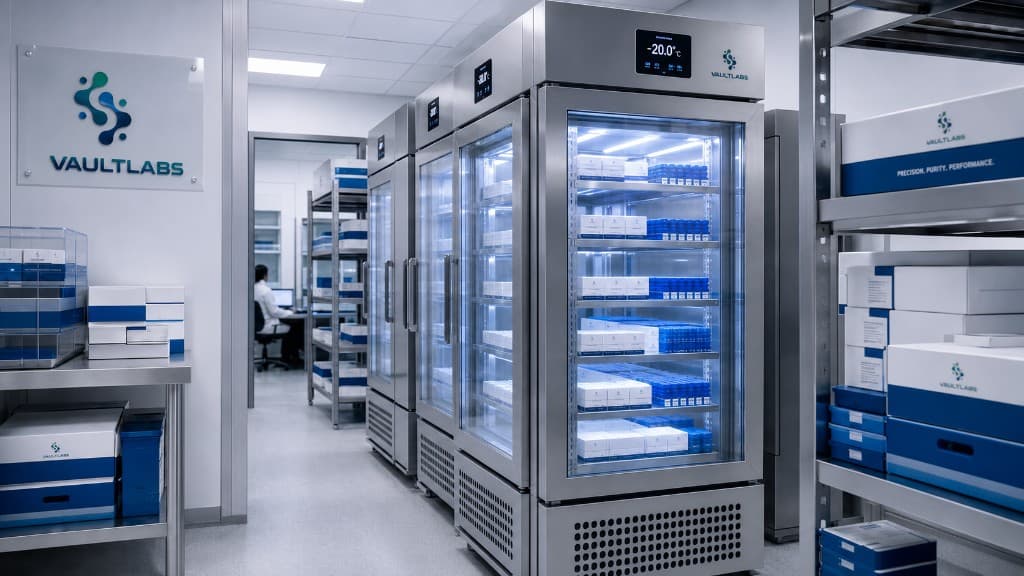
UAE fulfilment
Controlled storage before dispatch
Research materials are stored under monitored conditions at our UAE fulfilment workflow — with lot-organized inventory, temperature-aware handling, and tracked dispatch across all seven emirates.
Research use only. Images show handling workflow — not medical, therapeutic, or personal-use suitability.
Published batch testing summary
Current verified lots for the VaultLabs catalogue. Each row links to the full certificate (PDF download on the COA page). Purity and identity values are fixed per lot.
Independently tested lots
The figures below are taken from the Freedom Diagnostics or Janoshik Analytical report for that lot. Open the VaultLabs certificate and the laboratory PDF.
Janoshik verified
CJC-1295 (NO DAC) 5MG + IPAMORELIN 5MG
Sample on the report: CJC (no DAC) & Ipamorelin 10mg. Ipamorelin 4.83 mg. CJC-1295 (mod GRF 1-29) 4.68 mg. Testing ordered 26 September 2026. Sample received 7 October 2026. Analysis conducted 8 October 2026. Client: VaultLabs UAE. This blend report does not state a purity percentage.
- Task
- 238930
- Batch
- Oct 26
- Laboratory
- Janoshik Analytical
- Unique key
- 9426E7TG8A6X
Janoshik verified
GHK-CU 50MG
Purity 99.561%. Sample on the report: GHK-Cu 50mg. GHK-Cu 68.28 mg (GHK content 57.49 mg; copper content 10.79 mg). Purity 99.561%. The report states the sample was tested twice. Testing ordered 26 September 2026. Sample received 7 October 2026. Analysis conducted 8 October 2026. Client: VaultLabs UAE.
- Task
- 238942
- Batch
- Oct 26
- Laboratory
- Janoshik Analytical
- Unique key
- 1T21QF4XPTF2
Freedom verified
GLP-3 RT 10MG (RETA)
Purity 99.94%. Identity confirmed (LC-MS, GLP RT). Purity 99.94% (HPLC-UV). Net content 13.59 mg.
- Task
- 20280309
- Batch
- 2609221080
- Laboratory
- Freedom Diagnostics
- Unique key
- Vaul2609221080
Janoshik verified
WOLVERINE 10MG
Sample on the report: BPC-157 & TB-500 10mg. BPC-157 5.65 mg. TB-500 (TB4) 5.61 mg. Testing ordered 26 September 2026. Sample received 7 October 2026. Analysis conducted 9 October 2026. Client: VaultLabs UAE. This blend report does not state a purity percentage.
- Task
- 238923
- Batch
- Oct 26
- Laboratory
- Janoshik Analytical
- Unique key
- LZ9ZJ8MCCYQU
Wolverine 10 Mg
Click to verifyLab PDFView COA- Current lot
- 238923
- Purity
- Content reported
- Identity
- BPC-157/TB-500 blend analysis record
- Testing lab
- Janoshik Analytical
GHK-CU 50 Mg
Click to verifyLab PDFView COA- Current lot
- 238942
- Purity
- 99.561%
- Identity
- GHK (or GHK-Cu) analysis record
- Testing lab
- Janoshik Analytical
CJC-1295 (no Dac) 5 Mg + IPAMORELIN 5 Mg
Click to verifyLab PDFView COA- Current lot
- 238930
- Purity
- Content reported
- Identity
- CJC No DAC - MOD GRF (1-29)/Ipamorelin blend analysis record
- Testing lab
- Janoshik Analytical
GLP-3 Rt 10 Mg (reta)
Click to verifyLab PDFView COA- Current lot
- 20280309
- Purity
- 99.94%
- Identity
- HPLC-UV / LC-MS record
- Testing lab
- Freedom Diagnostics
GHK-CU 100 Mg
View COA- Current lot
- VL-GHKCU-20260317
- Purity
- 99.9%
- Identity
- HPLC identity record
- Testing lab
- VaultLabs Laboratory
GLP-3 Rt 10 Mg (reta)
View COA- Current lot
- VL-GLP3-20260317
- Purity
- 99.91%
- Identity
- HPLC identity record
- Testing lab
- VaultLabs Laboratory
GHK-CU 50 Mg
View COA- Current lot
- VL-GHK50-20260318
- Purity
- 99.89%
- Identity
- HPLC identity record
- Testing lab
- VaultLabs Laboratory
GHK-CU 100 Mg
View COA- Current lot
- VL-GHK100-20260319
- Purity
- 99.9%
- Identity
- HPLC identity record
- Testing lab
- VaultLabs Laboratory
GHK-CU Raw Powder 1g
View COA- Current lot
- VL-GHKRAW1-20260301
- Purity
- 99.9%
- Identity
- HPLC identity record
- Testing lab
- VaultLabs Laboratory
GHK-CU Raw Powder 20g
View COA- Current lot
- VL-GHKRAW20-20260307
- Purity
- 99.89%
- Identity
- HPLC identity record
- Testing lab
- VaultLabs Laboratory
AHK-CU 50 Mg
View COA- Current lot
- VL-AHK50-20260804
- Purity
- 99.87%
- Identity
- HPLC identity record
- Testing lab
- VaultLabs Laboratory
AHK-CU 100 Mg
View COA- Current lot
- VL-AHK100-20260320
- Purity
- 99.88%
- Identity
- HPLC identity record
- Testing lab
- VaultLabs Laboratory
Oxytocin 10 Mg
View COA- Current lot
- VL-OXY-20260317
- Purity
- 99.91%
- Identity
- HPLC identity record
- Testing lab
- VaultLabs Laboratory
CJC-1295 (no Dac) 5 Mg + IPAMORELIN 5 Mg
View COA- Current lot
- VL-CJCIPA-20260321
- Purity
- 99.9%
- Identity
- Confirmed (LC-MS)
- Testing lab
- VaultLabs Laboratory
BPC-157 10 Mg
View COA- Current lot
- VL-BPC-2026-0412
- Purity
- 99.91%
- Identity
- HPLC identity record
- Testing lab
- VaultLabs Laboratory
MT2 (Melanotan-2) 10 Mg
View COA- Current lot
- VL-MT2-20260322
- Purity
- 99.87%
- Identity
- HPLC identity record
- Testing lab
- VaultLabs Laboratory
PT-141 10 Mg
View COA- Current lot
- VL-PT141-20260323
- Purity
- 99.89%
- Identity
- HPLC identity record
- Testing lab
- VaultLabs Laboratory
Nad+ 1000 Mg
View COA- Current lot
- VL-NAD-20260324
- Purity
- 99.9%
- Identity
- HPLC identity record
- Testing lab
- VaultLabs Laboratory
Semax 10 Mg
View COA- Current lot
- VL-SEMAX-20260325
- Purity
- 99.88%
- Identity
- HPLC identity record
- Testing lab
- VaultLabs Laboratory
Sterile Water 3 Ml
View COA- Current lot
- VL-SW3-20260326
- Purity
- Sterile · Pass
- Identity
- Sterility panel · Pass
- Testing lab
- VaultLabs Laboratory
Sterile Water 10 Ml
View COA- Current lot
- VL-SW10-20260327
- Purity
- Sterile · Pass
- Identity
- Sterility panel · Pass
- Testing lab
- VaultLabs Laboratory
Bacteriostatic Water 3 Ml
View COA- Current lot
- VL-BAC3-20260328
- Purity
- Sterile · Pass
- Identity
- Sterility panel · Pass
- Testing lab
- VaultLabs Laboratory
Bacteriostatic Water 10 Ml
View COA- Current lot
- VL-BAC10-20260329
- Purity
- Sterile · Pass
- Identity
- Sterility panel · Pass
- Testing lab
- VaultLabs Laboratory
Glutathione 1500 Mg
View COA- Current lot
- VL-GLUT-20260317
- Purity
- 99.91%
- Identity
- HPLC identity record
- Testing lab
- VaultLabs Laboratory
MOT-C 10 Mg
View COA- Current lot
- VL-MOTC-20260318
- Purity
- 99.9%
- Identity
- HPLC identity record
- Testing lab
- VaultLabs Laboratory
KLOW 80 Mg
View COA- Current lot
- VL-KLOW-20260319
- Purity
- 99.89%
- Identity
- HPLC identity record
- Testing lab
- VaultLabs Laboratory
Glow 70 Mg
View COA- Current lot
- VL-GLOW-20260804
- Purity
- 99.88%
- Identity
- HPLC identity record
- Testing lab
- VaultLabs Laboratory
Igf-1 Lr3 100mcg
View COA- Current lot
- VL-IGF1-20260801
- Purity
- 99.9%
- Identity
- HPLC identity record
- Testing lab
- VaultLabs Laboratory
Mt1 10 Mg
View COA- Current lot
- VL-MT1-20260801
- Purity
- 99.88%
- Identity
- HPLC identity record
- Testing lab
- VaultLabs Laboratory
Tirzepatide 30 Mg
View COA- Current lot
- VL-TIRZ-20260801
- Purity
- 99.91%
- Identity
- HPLC identity record
- Testing lab
- VaultLabs Laboratory
Retatrutide + Cagrilintide 15 Mg (reta/cag)
View COA- Current lot
- VL-RETACAG-20260801
- Purity
- 99.89%
- Identity
- HPLC identity record
- Testing lab
- VaultLabs Laboratory
Semaglutide 30 Mg
View COA- Current lot
- VL-SEMA-20260801
- Purity
- 99.9%
- Identity
- HPLC identity record
- Testing lab
- VaultLabs Laboratory
GLP-3 Rt 20 Mg (reta)
View COA- Current lot
- VL-GLP3RT20-20260801
- Purity
- 99.91%
- Identity
- HPLC identity record
- Testing lab
- VaultLabs Laboratory
GLP-3 Rt 5 Mg (reta)
View COA- Current lot
- VL-GLP3RT5-20260917
- Purity
- 99.9%
- Identity
- HPLC identity record
- Testing lab
- VaultLabs Laboratory
GLP-3 Rt 15 Mg (reta)
View COA- Current lot
- VL-GLP3RT15-20260917
- Purity
- 99.89%
- Identity
- HPLC identity record
- Testing lab
- VaultLabs Laboratory
GLP-3 Rt 30 Mg (reta)
View COA- Current lot
- VL-GLP3RT30-20260917
- Purity
- 99.91%
- Identity
- HPLC identity record
- Testing lab
- VaultLabs Laboratory
Tesamorelin 5 Mg
View COA- Current lot
- VL-TESA-20260801
- Purity
- 99.89%
- Identity
- HPLC identity record
- Testing lab
- VaultLabs Laboratory
Tesamorelin 10 Mg
View COA- Current lot
- VL-TESA10-20260917
- Purity
- 99.9%
- Identity
- HPLC identity record
- Testing lab
- VaultLabs Laboratory
Wolverine 10 Mg
View COA- Current lot
- VL-WOLV-20260801
- Purity
- 99.88%
- Identity
- HPLC identity record
- Testing lab
- VaultLabs Laboratory
Selank + Semax 10 Mg Blend
View COA- Current lot
- VL-SELSEMAX-20260917
- Purity
- 99.89%
- Identity
- HPLC identity record
- Testing lab
- VaultLabs Laboratory
5-amino-1mq 10 Mg
View COA- Current lot
- VL-1MQ-20260917
- Purity
- 99.9%
- Identity
- HPLC identity record
- Testing lab
- VaultLabs Laboratory
Acetic Acid Sterile Solution 3 Ml
View COA- Current lot
- VL-AA3-20260917
- Purity
- Sterile · Pass
- Identity
- Sterility panel · Pass
- Testing lab
- VaultLabs Laboratory
Acetic Acid Sterile Solution 10 Ml
View COA- Current lot
- VL-AA10-20260917
- Purity
- Sterile · Pass
- Identity
- Sterility panel · Pass
- Testing lab
- VaultLabs Laboratory
Pinealon 10 Mg
View COA- Current lot
- VL-PIN-20260917
- Purity
- 99.88%
- Identity
- HPLC identity record
- Testing lab
- VaultLabs Laboratory
Kpv 10 Mg
View COA- Current lot
- VL-KPV-20260917
- Purity
- 99.91%
- Identity
- HPLC identity record
- Testing lab
- VaultLabs Laboratory
Tb-500 5 Mg
View COA- Current lot
- VL-TB500-20260917
- Purity
- 99.89%
- Identity
- HPLC identity record
- Testing lab
- VaultLabs Laboratory
IPAMORELIN 5 Mg
View COA- Current lot
- VL-IPA-20260917
- Purity
- 99.9%
- Identity
- HPLC identity record
- Testing lab
- VaultLabs Laboratory
Epithalon 10 Mg
View COA- Current lot
- VL-EPI-20260917
- Purity
- 99.88%
- Identity
- HPLC identity record
- Testing lab
- VaultLabs Laboratory
Ss-31 10 Mg
View COA- Current lot
- VL-SS31-20260917
- Purity
- 99.91%
- Identity
- HPLC identity record
- Testing lab
- VaultLabs Laboratory
Kisspeptin-10 5 Mg
View COA- Current lot
- VL-KP10-20260917
- Purity
- 99.89%
- Identity
- HPLC identity record
- Testing lab
- VaultLabs Laboratory
GLP-3 Rt 100 Mg (reta)
View COA- Current lot
- VL-GLP3RT100-20261020
- Purity
- 99.9%
- Identity
- HPLC identity record
- Testing lab
- VaultLabs Laboratory
BPC-157 20 Mg
View COA- Current lot
- VL-BPC20-20261020
- Purity
- 99.88%
- Identity
- HPLC identity record
- Testing lab
- VaultLabs Laboratory
MOT-C 20 Mg
View COA- Current lot
- VL-MOTC20-20261020
- Purity
- 99.91%
- Identity
- HPLC identity record
- Testing lab
- VaultLabs Laboratory
MOT-C 40 Mg
View COA- Current lot
- VL-MOTC40-20261020
- Purity
- 99.89%
- Identity
- HPLC identity record
- Testing lab
- VaultLabs Laboratory
Kpv 20 Mg
View COA- Current lot
- VL-KPV20-20261020
- Purity
- 99.9%
- Identity
- HPLC identity record
- Testing lab
- VaultLabs Laboratory
Cagrilintide 5 Mg
View COA- Current lot
- VL-CAGR5-20261020
- Purity
- 99.87%
- Identity
- HPLC identity record
- Testing lab
- VaultLabs Laboratory
Cagrilintide 10 Mg
View COA- Current lot
- VL-CAGR10-20261020
- Purity
- 99.91%
- Identity
- HPLC identity record
- Testing lab
- VaultLabs Laboratory
Snap-8 10 Mg
View COA- Current lot
- VL-SNAP8-20261020
- Purity
- 99.88%
- Identity
- HPLC identity record
- Testing lab
- VaultLabs Laboratory
Vip 10 Mg
View COA- Current lot
- VL-VIP-20261020
- Purity
- 99.9%
- Identity
- HPLC identity record
- Testing lab
- VaultLabs Laboratory
Aod-9604 5 Mg
View COA- Current lot
- VL-AOD5-20261020
- Purity
- 99.89%
- Identity
- HPLC identity record
- Testing lab
- VaultLabs Laboratory
Dsip 5 Mg
View COA- Current lot
- VL-DSIP5-20261020
- Purity
- 99.91%
- Identity
- HPLC identity record
- Testing lab
- VaultLabs Laboratory
Adamax 10 Mg
View COA- Current lot
- VL-ADAMAX-20261020
- Purity
- 99.88%
- Identity
- HPLC identity record
- Testing lab
- VaultLabs Laboratory
Ara-290 10 Mg
View COA- Current lot
- VL-ARA10-20261020
- Purity
- 99.9%
- Identity
- HPLC identity record
- Testing lab
- VaultLabs Laboratory
Cerebrolysin 60 Mg
View COA- Current lot
- VL-CBL60-20261020
- Purity
- 99.89%
- Identity
- HPLC identity record
- Testing lab
- VaultLabs Laboratory
Matrixyl 10 Mg
View COA- Current lot
- VL-MATR-20261020
- Purity
- 99.87%
- Identity
- HPLC identity record
- Testing lab
- VaultLabs Laboratory
Vesugen 10 Mg
View COA- Current lot
- VL-VES-20261020
- Purity
- 99.9%
- Identity
- HPLC identity record
- Testing lab
- VaultLabs Laboratory
| Product | Current lot | Purity | Identity | Testing lab | Report |
|---|---|---|---|---|---|
| Wolverine 10 Mg | 238923 | Content reported | BPC-157/TB-500 blend analysis record | Janoshik Analytical | Click to verifyLab PDFView COA |
| GHK-CU 50 Mg | 238942 | 99.561% | GHK (or GHK-Cu) analysis record | Janoshik Analytical | Click to verifyLab PDFView COA |
| CJC-1295 (no Dac) 5 Mg + IPAMORELIN 5 Mg | 238930 | Content reported | CJC No DAC - MOD GRF (1-29)/Ipamorelin blend analysis record | Janoshik Analytical | Click to verifyLab PDFView COA |
| GLP-3 Rt 10 Mg (reta) | 20280309 | 99.94% | HPLC-UV / LC-MS record | Freedom Diagnostics | Click to verifyLab PDFView COA |
| GHK-CU 100 Mg | VL-GHKCU-20260317 | 99.9% | HPLC identity record | VaultLabs Laboratory | View COA |
| GLP-3 Rt 10 Mg (reta) | VL-GLP3-20260317 | 99.91% | HPLC identity record | VaultLabs Laboratory | View COA |
| GHK-CU 50 Mg | VL-GHK50-20260318 | 99.89% | HPLC identity record | VaultLabs Laboratory | View COA |
| GHK-CU 100 Mg | VL-GHK100-20260319 | 99.9% | HPLC identity record | VaultLabs Laboratory | View COA |
| GHK-CU Raw Powder 1g | VL-GHKRAW1-20260301 | 99.9% | HPLC identity record | VaultLabs Laboratory | View COA |
| GHK-CU Raw Powder 20g | VL-GHKRAW20-20260307 | 99.89% | HPLC identity record | VaultLabs Laboratory | View COA |
| AHK-CU 50 Mg | VL-AHK50-20260804 | 99.87% | HPLC identity record | VaultLabs Laboratory | View COA |
| AHK-CU 100 Mg | VL-AHK100-20260320 | 99.88% | HPLC identity record | VaultLabs Laboratory | View COA |
| Oxytocin 10 Mg | VL-OXY-20260317 | 99.91% | HPLC identity record | VaultLabs Laboratory | View COA |
| CJC-1295 (no Dac) 5 Mg + IPAMORELIN 5 Mg | VL-CJCIPA-20260321 | 99.9% | Confirmed (LC-MS) | VaultLabs Laboratory | View COA |
| BPC-157 10 Mg | VL-BPC-2026-0412 | 99.91% | HPLC identity record | VaultLabs Laboratory | View COA |
| MT2 (Melanotan-2) 10 Mg | VL-MT2-20260322 | 99.87% | HPLC identity record | VaultLabs Laboratory | View COA |
| PT-141 10 Mg | VL-PT141-20260323 | 99.89% | HPLC identity record | VaultLabs Laboratory | View COA |
| Nad+ 1000 Mg | VL-NAD-20260324 | 99.9% | HPLC identity record | VaultLabs Laboratory | View COA |
| Semax 10 Mg | VL-SEMAX-20260325 | 99.88% | HPLC identity record | VaultLabs Laboratory | View COA |
| Sterile Water 3 Ml | VL-SW3-20260326 | Sterile · Pass | Sterility panel · Pass | VaultLabs Laboratory | View COA |
| Sterile Water 10 Ml | VL-SW10-20260327 | Sterile · Pass | Sterility panel · Pass | VaultLabs Laboratory | View COA |
| Bacteriostatic Water 3 Ml | VL-BAC3-20260328 | Sterile · Pass | Sterility panel · Pass | VaultLabs Laboratory | View COA |
| Bacteriostatic Water 10 Ml | VL-BAC10-20260329 | Sterile · Pass | Sterility panel · Pass | VaultLabs Laboratory | View COA |
| Glutathione 1500 Mg | VL-GLUT-20260317 | 99.91% | HPLC identity record | VaultLabs Laboratory | View COA |
| MOT-C 10 Mg | VL-MOTC-20260318 | 99.9% | HPLC identity record | VaultLabs Laboratory | View COA |
| KLOW 80 Mg | VL-KLOW-20260319 | 99.89% | HPLC identity record | VaultLabs Laboratory | View COA |
| Glow 70 Mg | VL-GLOW-20260804 | 99.88% | HPLC identity record | VaultLabs Laboratory | View COA |
| Igf-1 Lr3 100mcg | VL-IGF1-20260801 | 99.9% | HPLC identity record | VaultLabs Laboratory | View COA |
| Mt1 10 Mg | VL-MT1-20260801 | 99.88% | HPLC identity record | VaultLabs Laboratory | View COA |
| Tirzepatide 30 Mg | VL-TIRZ-20260801 | 99.91% | HPLC identity record | VaultLabs Laboratory | View COA |
| Retatrutide + Cagrilintide 15 Mg (reta/cag) | VL-RETACAG-20260801 | 99.89% | HPLC identity record | VaultLabs Laboratory | View COA |
| Semaglutide 30 Mg | VL-SEMA-20260801 | 99.9% | HPLC identity record | VaultLabs Laboratory | View COA |
| GLP-3 Rt 20 Mg (reta) | VL-GLP3RT20-20260801 | 99.91% | HPLC identity record | VaultLabs Laboratory | View COA |
| GLP-3 Rt 5 Mg (reta) | VL-GLP3RT5-20260917 | 99.9% | HPLC identity record | VaultLabs Laboratory | View COA |
| GLP-3 Rt 15 Mg (reta) | VL-GLP3RT15-20260917 | 99.89% | HPLC identity record | VaultLabs Laboratory | View COA |
| GLP-3 Rt 30 Mg (reta) | VL-GLP3RT30-20260917 | 99.91% | HPLC identity record | VaultLabs Laboratory | View COA |
| Tesamorelin 5 Mg | VL-TESA-20260801 | 99.89% | HPLC identity record | VaultLabs Laboratory | View COA |
| Tesamorelin 10 Mg | VL-TESA10-20260917 | 99.9% | HPLC identity record | VaultLabs Laboratory | View COA |
| Wolverine 10 Mg | VL-WOLV-20260801 | 99.88% | HPLC identity record | VaultLabs Laboratory | View COA |
| Selank + Semax 10 Mg Blend | VL-SELSEMAX-20260917 | 99.89% | HPLC identity record | VaultLabs Laboratory | View COA |
| 5-amino-1mq 10 Mg | VL-1MQ-20260917 | 99.9% | HPLC identity record | VaultLabs Laboratory | View COA |
| Acetic Acid Sterile Solution 3 Ml | VL-AA3-20260917 | Sterile · Pass | Sterility panel · Pass | VaultLabs Laboratory | View COA |
| Acetic Acid Sterile Solution 10 Ml | VL-AA10-20260917 | Sterile · Pass | Sterility panel · Pass | VaultLabs Laboratory | View COA |
| Pinealon 10 Mg | VL-PIN-20260917 | 99.88% | HPLC identity record | VaultLabs Laboratory | View COA |
| Kpv 10 Mg | VL-KPV-20260917 | 99.91% | HPLC identity record | VaultLabs Laboratory | View COA |
| Tb-500 5 Mg | VL-TB500-20260917 | 99.89% | HPLC identity record | VaultLabs Laboratory | View COA |
| IPAMORELIN 5 Mg | VL-IPA-20260917 | 99.9% | HPLC identity record | VaultLabs Laboratory | View COA |
| Epithalon 10 Mg | VL-EPI-20260917 | 99.88% | HPLC identity record | VaultLabs Laboratory | View COA |
| Ss-31 10 Mg | VL-SS31-20260917 | 99.91% | HPLC identity record | VaultLabs Laboratory | View COA |
| Kisspeptin-10 5 Mg | VL-KP10-20260917 | 99.89% | HPLC identity record | VaultLabs Laboratory | View COA |
| GLP-3 Rt 100 Mg (reta) | VL-GLP3RT100-20261020 | 99.9% | HPLC identity record | VaultLabs Laboratory | View COA |
| BPC-157 20 Mg | VL-BPC20-20261020 | 99.88% | HPLC identity record | VaultLabs Laboratory | View COA |
| MOT-C 20 Mg | VL-MOTC20-20261020 | 99.91% | HPLC identity record | VaultLabs Laboratory | View COA |
| MOT-C 40 Mg | VL-MOTC40-20261020 | 99.89% | HPLC identity record | VaultLabs Laboratory | View COA |
| Kpv 20 Mg | VL-KPV20-20261020 | 99.9% | HPLC identity record | VaultLabs Laboratory | View COA |
| Cagrilintide 5 Mg | VL-CAGR5-20261020 | 99.87% | HPLC identity record | VaultLabs Laboratory | View COA |
| Cagrilintide 10 Mg | VL-CAGR10-20261020 | 99.91% | HPLC identity record | VaultLabs Laboratory | View COA |
| Snap-8 10 Mg | VL-SNAP8-20261020 | 99.88% | HPLC identity record | VaultLabs Laboratory | View COA |
| Vip 10 Mg | VL-VIP-20261020 | 99.9% | HPLC identity record | VaultLabs Laboratory | View COA |
| Aod-9604 5 Mg | VL-AOD5-20261020 | 99.89% | HPLC identity record | VaultLabs Laboratory | View COA |
| Dsip 5 Mg | VL-DSIP5-20261020 | 99.91% | HPLC identity record | VaultLabs Laboratory | View COA |
| Adamax 10 Mg | VL-ADAMAX-20261020 | 99.88% | HPLC identity record | VaultLabs Laboratory | View COA |
| Ara-290 10 Mg | VL-ARA10-20261020 | 99.9% | HPLC identity record | VaultLabs Laboratory | View COA |
| Cerebrolysin 60 Mg | VL-CBL60-20261020 | 99.89% | HPLC identity record | VaultLabs Laboratory | View COA |
| Matrixyl 10 Mg | VL-MATR-20261020 | 99.87% | HPLC identity record | VaultLabs Laboratory | View COA |
| Vesugen 10 Mg | VL-VES-20261020 | 99.9% | HPLC identity record | VaultLabs Laboratory | View COA |
Values are batch-specific and taken from the published certificate for that lot. A batch lists Janoshik, METS Lab, or Freedom Diagnostics only when that lot has their report.
Current shipping lot
GLP-3 RT 10mg in the UAE
The current published GLP-3 RT 10mg (Retatrutide) shipping lot in the UAE is 20280309. The laboratory named on that certificate is Freedom Diagnostics. Published purity is 99.94% by HPLC-UV / LC-MS, search code Vaul2609221080. VaultLabs dispatches this line from Dubai to all seven emirates with checkout in AED. Janoshik Analytical and METS Lab are named counterparties; they appear on a batch only when that lot has their report. This lot’s published report is Freedom Diagnostics only.
- Lot
- 20280309
- Laboratory
- Freedom Diagnostics
- Purity / method
- 99.94% · HPLC-UV / LC-MS
- Search code
- Vaul2609221080
Document types
- Third-party report published — analytical report from an external laboratory when uploaded and labelled as such.
- Supplier document published — manufacturer or supplier COA / release paperwork.
- Testing pending — workflow in progress; no public file yet.
- Document unavailable — no file published for that lot and test type at this time.
Matching reports to lots
Each vial label should carry a lot identifier tied to inventory. Published documents reference the same lot and catalogue number. If a lot is not listed online, contact support with your order reference — absence from the portal does not mean a batch failed testing.
Open batch verification →Frequently asked questions
- What documents are included with VaultLabs materials?
- Each catalogue batch is tested twice before release. Each order ships with a Certificate of Analysis and a traceable lot number. Identity and purity appear on the COA — match your vial label to the record on batch verification. Document type is labelled on each record.
- What purity levels are documented?
- Published COA records report purity for the specific lot tested — often above 99% when that figure appears on the certificate. The exact purity value is batch-specific on the certificate.
- What is the difference between identity and purity?
- Identity confirms the material matches the expected compound. Purity describes the proportion of the target compound relative to detected impurities in the analytical method used. They answer different laboratory questions.
- Does purity equal the labelled amount in the vial?
- No. Purity is an analytical ratio. Labelled quantity (for example 10 mg) is a separate specification that may be supported by quantitative testing when published for that lot.
- Is each batch tested more than once?
- Yes. Each catalogue batch is tested twice before release — a first assay and a confirmation assay. Partner laboratories include Janoshik Analytical, METS Lab, and Freedom Diagnostics. The laboratory printed on the published certificate is the laboratory for that lot, and a batch shows Janoshik, METS, or Freedom only when that lot has their report.
- What is the difference between supplier and independent testing?
- Supplier or internal documents reflect release and handling records from the supply chain. Independent third-party testing is performed by an external laboratory. VaultLabs labels document type clearly on verification results — a PDF alone is not automatically independent testing.
- What does pending or unavailable mean?
- Pending means the record exists in workflow but is not yet published online. Unavailable means no document is currently published for that lot and test type. Neither status implies a pass or fail result.
- Who tested the current GLP-3 RT 10mg lot available in the UAE?
- The current published GLP-3 RT 10mg (Retatrutide) shipping lot in the UAE is 20280309. The laboratory named on that certificate is Freedom Diagnostics. Published purity is 99.94% by HPLC-UV / LC-MS, search code Vaul2609221080. VaultLabs dispatches this line from Dubai to all seven emirates with checkout in AED. Janoshik Analytical and METS Lab are named counterparties; they appear on a batch only when that lot has their report. This lot’s published report is Freedom Diagnostics only.
- How do I verify a report?
- Use the lot number on your vial label in the batch verification portal. The published COA and test record should match your catalogue number, lot, and document type — this confirms you are viewing the correct certificate for your material.
- What does VaultLabs not claim?
- VaultLabs does not claim medical, therapeutic, or personal-use suitability. Published analytical records describe material characteristics for research use — not clinical outcomes or sterility for human use. A partner laboratory name is not a substitute for the laboratory printed on that lot’s certificate.
Products are intended exclusively for in vitro laboratory research, analytical testing, and scientific study.